
Champion Golf (1983)
- Pages
- 6
- Source
- scanned, Champion_Golf_1983_Au_color.pdf
- Per page
- about 99 KB — only what you read
- Text layer
- yes — searchable

CHAMPION GOLF
HOW TO PLAY
For 1 or 2 players
When
playing,
evaluate
the
wind
direction,
velocity and
turf condition, and also be careful of
the
caddie’s
position
and
in how
you
use
the
clubs. This
is an authentic golf game which you
and your family can
fully enjoy
at home, regard-
less of what the weather
is outside.
BEFORE YOU
START....
1
. This Game Cartridge
is intended
for SEGA
Personal
Corpputer SC-3000
or Computer
Video Game SG-1000.
2. Turn the power switch on
after inserting the
Cartridge
in the ROM Cartridge Inlet of the
Body. The Body and /or the Cartridge may
be damaged
if you
insert the Cartridge
in
the Body without turning the power
off.
3. Use the Joystick when playing the game on
the SG-1000. When playing the game on the
SC-3000, either the Keyboard or the Joystick
(an option) is usable.
4. JOYSTICK: When using the JOYSTICK with
SC-3000, connect
it with "JOY 1.” When two
players play the game, connect
it with "JOY
2.”
also.
5. KEYBOARD: Refer to the drawing.
6. Pull
out
the
Cartridge
after
turning
the
power
off. Keep
it
in
its case and
handle
with
extreme
care.
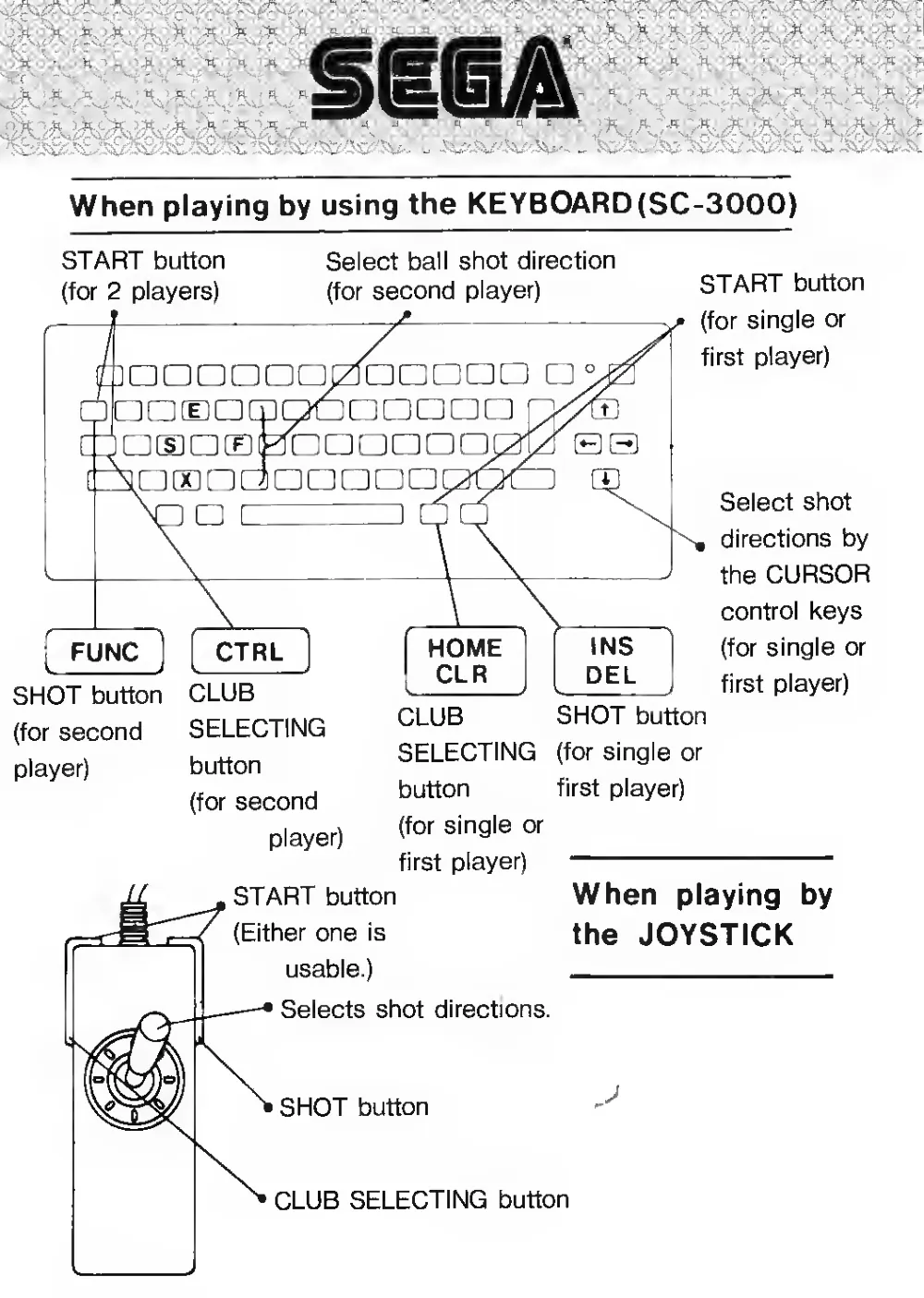
When playing by using the KEYB0ARD(SC-3000)
START button
(for 2 players)
Select ball shot direction
(for second player)
C
aaonoqjzlDQoaa
Eamaaaaaao
EDE0LIDDDDD
!!]
CTRL
SHOT button
(for second
player)
CLUB
SELECTING
button
(for second
player)
START button
(for single or
first player)
Select shot
directions by
the CURSOR
control keys
(for single or
first player)
CLUB
SELECTING
button
(for single or
first player)
SHOT button
(for single or
first player)
START button
(Either one
is
usable.)
Selects shot directions.
SHOT button
When
playing
by
the JOYSTICK
CLUB SELECTING button

How To
Play
* When playing by using the JOYSTICK
For
1
player, connect the JOYSTICK to "JOY
1” and press the START
button.
For 2 players, connect the JOYSTICK to "JOY 1” and "JOY 2
" and then
press the START button of "JOY 2”.
* When playing by using the KEYBOARD (SC-3000)
refer
to the
illust-
ration.
* Every time
the club
selection button
is
pressed, the club
indication
changes
in the order as stated below and you can select the club you
wish to use.
Order:
1W - 3W - 51 -»
71 — 91 —
1W -» 3W -*
(repeated).
However,
in the rough only clubs
51 —71 —
91 —*51 —
(repeated) can be used.
In the bunker area only the SW club, and on the green only
the PT club, are usable.
» After choosing the club which you wish to use, move the caddie who
is on the outside of the frame of the field on the screen to select the
shot direction by maneuvering the JOYSTICK or by using the control
key (the ball
hit flies in the direction of the caddie).
* Watching the man who
is repeatedly swinging the club at the upper
left hand side of the screen, press the shot button to shoot the ball at
just the right moment when the club is swung up.
The strength
of the shot depends
of the
length
of the swing. When
pressing the shot button at the peak of the swing, the strength of the
shot
will be at a maximum
level. When the swing
is at
its lowest, the
strength of the shot will be at a minimum level.
When pressing the shot button
at the time the club
is
at the lowest
part of the swing, the ball will go only a short distance.
* The arrow
in the box on the upper part of the screen
indicates the
wind
direction and
velocity. On the green, however, the arrow
refers
to the turf condition.
* In the rough, the
ball's
flight distance
is shorter than
in the
fairway.
* For 2
players, the game
starts with the
first player shooting the
ball
first and thereafter the player who has the longer distance to the cup
shoots the ball.
* In
the case
of OB
(out
of bounds),
the
player
picks up 2
penalty
strokes and
will have
to continue shooting from the
location
of the
prior shot.
When
the
ball
is
lost
in
the
pond, the
player picks up one penalty
stroke and
is required
to continue shooting the
ball from the edge of
the pond.

CAUTION:
This game
is one of SEGA's original prod-
ucts. The
sales
of program
contents
by
copying them without permission, whether
c sega 1983
partially or wholly, is strictly prohibited.
SEGA ENTERPRISES, LTD.
Head
Office: 2-12, Haneda '1-chome, Ohta-ku,
Tokyo
144
, Japan
Tel: 03-742-3171
For inquiries, please
contact
the
Personal
Computer Division